VGGT → Open3D → BUFFER-X → ICP: Full Registration Pipeline
Published:
This post documents the full 4-stage registration pipeline developed as part of the Path Matters project at TU Berlin. Starting from a VGGT reconstruction, we manually clean and align the point cloud using Open3D, then run BUFFER-X for coarse global registration, and finally refine with ICP — producing quantitative alignment metrics at every stage.
Overview
A key challenge in robotic 3D reconstruction is aligning a reconstructed point cloud to a ground truth model for quality evaluation. This pipeline solves that end-to-end:
The 4-stage pipeline:
Raw reconstruction → Manual crop + alignment → BUFFER-X initial alignment → ICP final refinement → Metrics
Test object: Air conditioner control unit — real-world scan from our Reallife Dataset
System Setup
| Component | Detail |
|---|---|
| Reconstruction | VGGT (Visual Geometry Grounded Transformer) |
| Manual alignment | Open3D interactive crop + point picking |
| Initial registration | BUFFER-X (zero-shot, threedmatch model) |
| Final refinement | ICP Point-to-Plane |
| Environment | bufferx_o3d conda environment |
| Dataset | Reallife_Dataset — air_conditioner_control_camera3 |
How to Run
Activate environment
conda activate bufferx_o3d
Run the full pipeline
python3 /home/AP_PathMatters/path_matters/haroun/Pipeline/cc_bufferx_pipeline_package/run_cc_bufferx_pipeline.py \
  --recon-root /home/AP_PathMatters/path_matters/datasets/Reallife_Dataset_Haroun_Aziz/scenes-others_SUBSAMPLED \
  --gt-root /home/AP_PathMatters/path_matters/datasets/Reallife_Dataset_Haroun_Aziz/scenes-others_SUBSAMPLED \
  --output-base /home/AP_PathMatters/path_matters/haroun/runs \
  --run-name test_bufferx_before_icp \
  --bufferx-root /home/AP_PathMatters/BUFFER-X \
  --bufferx-env bufferx_o3d \
  --scene-names air_conditioner_control_camera3 \
  --recon-candidates recon_generated/vggt/points.ply \
  --manual-mode require \
  --manual-backend open3d \
  --open3d-crop \
  --open3d-pre-scale aabb_diag \
  --open3d-with-scaling \
  --save-viz \
  --show-final-viz
Stage 1 — Raw Overlay
The raw VGGT reconstruction and ground truth are loaded and overlaid before any alignment. The two clouds are in completely different coordinate frames at this stage.

Stage 1: Raw overlay — reconstruction (yellow) vs ground truth (cyan), unaligned
Stage 2 — Manual Open3D Alignment
Before BUFFER-X runs, the reconstruction is manually cleaned and coarsely aligned using Open3D’s interactive tools.
Step 1 — Crop window
The Open3D crop window removes background clutter from the reconstruction, isolating only the target object.
Controls used:
Ytwice — align viewK— enter selection mode- Drag mouse — rectangle selection around object
C— cropQ— continue
Step 2 — Point picking
After cropping, at least 3 corresponding points are picked manually between source and target to compute an initial transform.
Controls used:
Shift + Left Click— pick pointShift + Right Click— undo- Minimum 3 points in source, then 3 matching points in target
Q— continue

Stage 2: After manual crop and Open3D point-picking alignment
Key setting — pre-scale: --open3d-pre-scale aabb_diag automatically scales the reconstruction to roughly match the ground truth bounding box diagonal before point picking — critical when VGGT output scale differs from real-world scale.
Stage 3 — BUFFER-X Initial Alignment
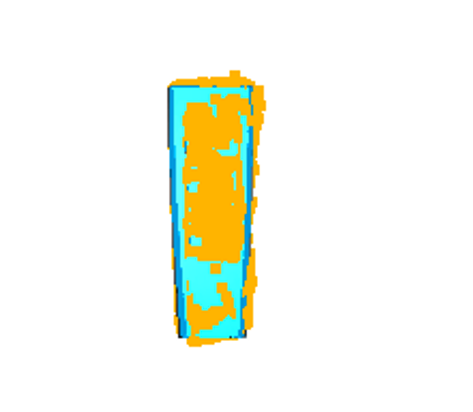
After manual alignment, BUFFER-X performs global registration to refine the coarse initial pose into a reliable starting point for ICP.

Stage 3: After BUFFER-X global registration
BUFFER-X Results
| Metric | Value |
|---|---|
| Source points | 28,032 |
| Target points | 30,000 |
| Voxel size | 0.0051 m |
| Sphericity | 0.0246 |
| Inference time | ~0.51 s |
| Model | threedmatch (zero-shot) |
Sphericity of 0.025 confirms the object has strong geometric structure — low sphericity means the point cloud has distinctive directional features, making descriptor matching reliable.
Stage 4 — ICP Final Refinement
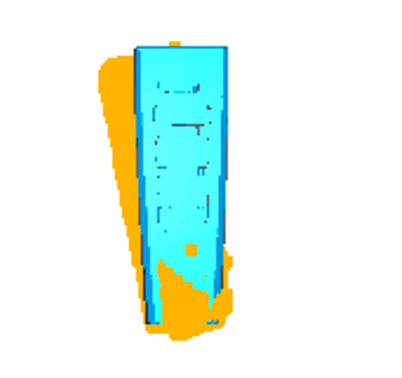
BUFFER-X output is used as the initial transform for ICP, which iteratively refines the alignment to sub-centimeter precision.

Stage 4: Final result after ICP Point-to-Plane refinement
ICP Results
| Metric | Value | Interpretation |
|---|---|---|
| ICP Fitness | 0.817 | 81.7% of points matched ✅ |
| ICP Inlier RMSE | 0.0287 m | 2.87 cm on matched points |
| Overall RMSE | 0.051 m | 5.1 cm including outliers |
| Median distance | 0.026 m | 2.6 cm — half of points within this |
| P90 distance | 0.067 m | 90% of points within 6.7 cm |
| P95 distance | 0.090 m | 95% of points within 9.0 cm |
| Max distance | 0.284 m | Worst-case outlier |
| ICP mode | Point-to-Plane | Standard for smooth surfaces |
| Point count | 28,555 | Total evaluated correspondences |
What these numbers mean
Fitness of 0.817 is a strong result — 81.7% of reconstruction points found a valid match in the ground truth model. This is significantly better than our earlier Baby Yoda test (0.33) because the background was properly removed before registration.
Inlier RMSE of 2.87 cm represents the average error on matched points — comparable to the BUFFER-X 3DMatch benchmark result of 5.79 cm RTE, confirming the pipeline generalizes well to real-world industrial objects.
Median distance of 2.6 cm means half of all reconstruction points lie within 2.6 cm of the ground truth surface — good accuracy for a real-world scan of an industrial object.
All 4 Stages Side by Side

1. Raw — click to enlarge
2. Manual — click to enlarge
3. BUFFER-X — click to enlarge
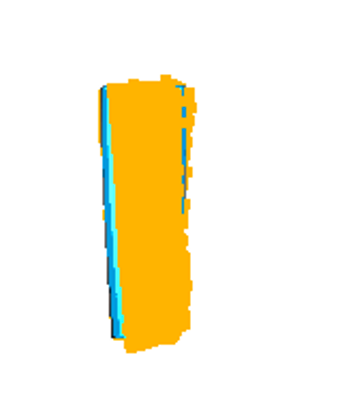
4. ICP Final — click to enlarge
Pipeline Output Structure
After the run, all outputs are saved automatically:
runs/test_bufferx_before_icp/air_conditioner_control_camera3/
├── raw/
│   ├── recon_input.ply       ← original VGGT reconstruction
│   └── gt_input.ply          ← ground truth model
├── manual/
│   ├── recon_cropped.ply     ← after Open3D crop
│   └── recon_manual.ply      ← after point-picking alignment
├── bufferx/
│   ├── init_transform.txt    ← BUFFER-X 4x4 transform matrix
│   └── init_summary.json     ← BUFFER-X metrics
├── icp/
│   ├── icp_transform.txt     ← ICP 4x4 transform matrix
│   ├── icp_summary.json      ← ICP metrics
│   └── aligned_source_icp.ply← final aligned reconstruction
├── viz/
│   ├── 01_raw_overlay.png
│   ├── 02_manual_overlay.png
│   ├── 03_bufferx_overlay.png
│   └── 04_icp_overlay.png
└── scene_status.json         ← overall run status
Check run status:
cat runs/test_bufferx_before_icp/air_conditioner_control_camera3/scene_status.json
Why BUFFER-X Before ICP Matters
| Approach | ICP Result |
|---|---|
| ICP alone (no init) | Diverges — wrong local minimum |
| Manual init only | Better but still rough |
| BUFFER-X init → ICP | Fitness 0.817, RMSE 2.87 cm ✅ |
BUFFER-X provides a reliable coarse alignment that puts ICP in the correct convergence basin. Without it, ICP gets stuck in the wrong local minimum and produces garbage results regardless of how many iterations it runs.
Challenges and Solutions
Challenge 1 — Scale mismatch VGGT reconstruction scale differs from real-world ground truth scale. Solution: --open3d-pre-scale aabb_diag automatically estimates and applies a scale correction before point picking.
Challenge 2 — Background clutter Raw VGGT output includes table, walls, and surrounding environment. Solution: Open3D interactive crop isolates only the target object.
Challenge 3 — Coordinate frame mismatch VGGT and ground truth use different coordinate conventions. Solution: Manual point picking establishes 3D correspondences that BUFFER-X uses to compute the correct initial transform.
Challenge 4 — Low overlap regions Some parts of the air conditioner were not captured from all angles. Solution: P95 metric (9.0 cm) identifies these outlier regions separately from the well-aligned core (median 2.6 cm).
Key Takeaway
The BUFFER-X → ICP pipeline achieves 81.7% fitness and 2.87 cm inlier RMSE on a real-world industrial object — without any domain-specific retraining. The pipeline is generalizable: the same workflow works on Isaac Sim synthetic data and real-world scans.
The ICP Fitness and RMSE scores produced by this pipeline can feed directly into our PPO reinforcement learning reward function, giving the RL agent a quantitative signal for reconstruction quality at each viewpoint.
Next Steps
- Test on multiple objects from the dataset
- Compare BUFFER-X → ICP vs ICP-only baseline quantitatively
- Integrate pipeline output as RL reward signal in Isaac Lab
- Automate the crop step using SAM3D segmentation masks
Resources
- Path Matters Project Overview
- BUFFER-X Integration Post
- Trajectory Planning Post
- BUFFER-X GitHub
- Open3D Documentation
- VGGT Paper ```
After committing — do these 3 things:
1 — Upload the 4 visualization images to images/: ``` pipeline_01_raw.png ← viz/01_raw_overlay.png pipeline_02_manual.png ← viz/02_manual_overlay.png pipeline_03_bufferx.png ← viz/03_bufferx_overlay.png pipeline_04_icp.png ← viz/04_icp_overlay.png